Week 6
Automation
- Instructors
- Maclean Gaulin
Automation in Businesses
- Accelerating massively
- Automating data acquisition
- Automating data usage
- Automating tasks
- One area in which LLMs are particularly useful
Automating Data Acquisition
- Companies acquire (ingest) a huge volume of data
- More than possible to manually acquire and store
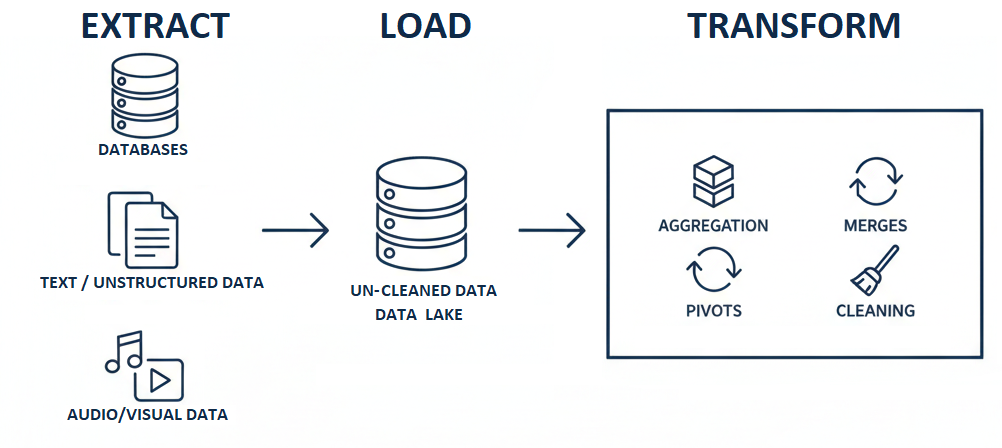
- ETL is the process of automating data acquisition, cleaning, and storage
- Extract, Transform, Load
- RPA is the process of automating these, and other, processes generally
- Robotic Process Automation
Extract, Transform, Load
- Acquiring data needs to be robust and repeatable
- Extract
- Ingest data
- Transform
- Clean and format data
- Load
- Save data to storage
- Determine what data is needed
- Determine how to access data
- Reads from other databases (external or internal)
- Download files (FTP, REST/HTTPS, etc.)
- Files (csv, excel, pdfs, etc.)
- Automate the access
- Validate data
- Check expectations: format, columns, observations
- Check integrity: missing data, values (limits/categories)
- Clean data
- Remove extraneous data (extra columns, rows)
- Clean formatting (parse negatives, dates, categoricals)
- Fix known errors, clean strings, fill missings
- Aggregate & restructure
- Merge datasets
- Create new variables
- Save now clean and formatted data
- Write to database / data warehouse
- Handle errors that may occur due to any uncaught issues
- Save to disk (excel)
- Generate reports
Example ETL
- Ask your favorite LLM to:
- Describe the ETL steps for downloading Compustat from WRDS and loading into a Postgres database
- Were there manual steps? What did it suggest?
- How many programs or scripts did it outline?
- What error handling did it have?
- What logging was suggested?
ETL ELT
- ELT is just ETL for future you
- Doesn’t change logic, just pushes ETL back one step
Automating Data Use
- Robotic Process Automation (RPA) to achieve specific tasks
- Dashboards, KPIs for decision makers
- Continual process analysis, internal audit
- Small one-off tasks (filing PDFs, scraping data, etc.)
When & What to Automate
- Value = # tasks time labor – costs to automate
- Repetitive: the task is done many times, or frequently
- Describable: the task’s steps and your decisions are based on clear, consistent rules you can write down
- Mundane: it’s a boring or routine task that takes time but not brainpower
What is Robotic Process Automation?
- Approaches automating manual processes
- Accounting and Finance lag adoption in other areas
- Manufacturing @ 35% adoption, Finance @ 8%
- Larce perceived ROI: (Deloitte 2022)
- 30% cost reduction and 25% revenue increase
- 17 month payback period
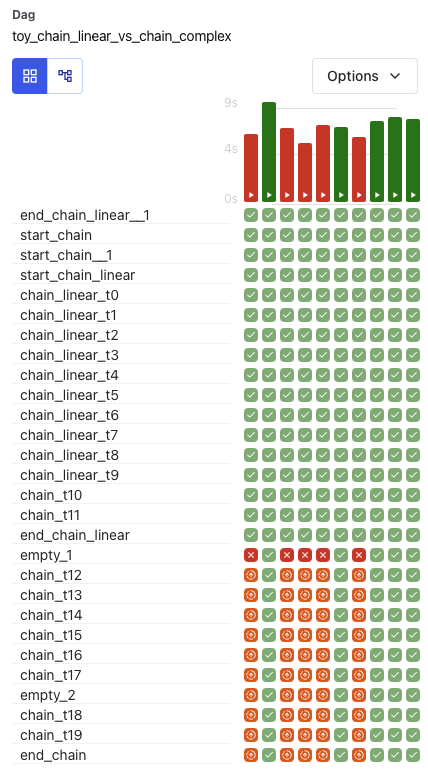
Example: Apache Airflow
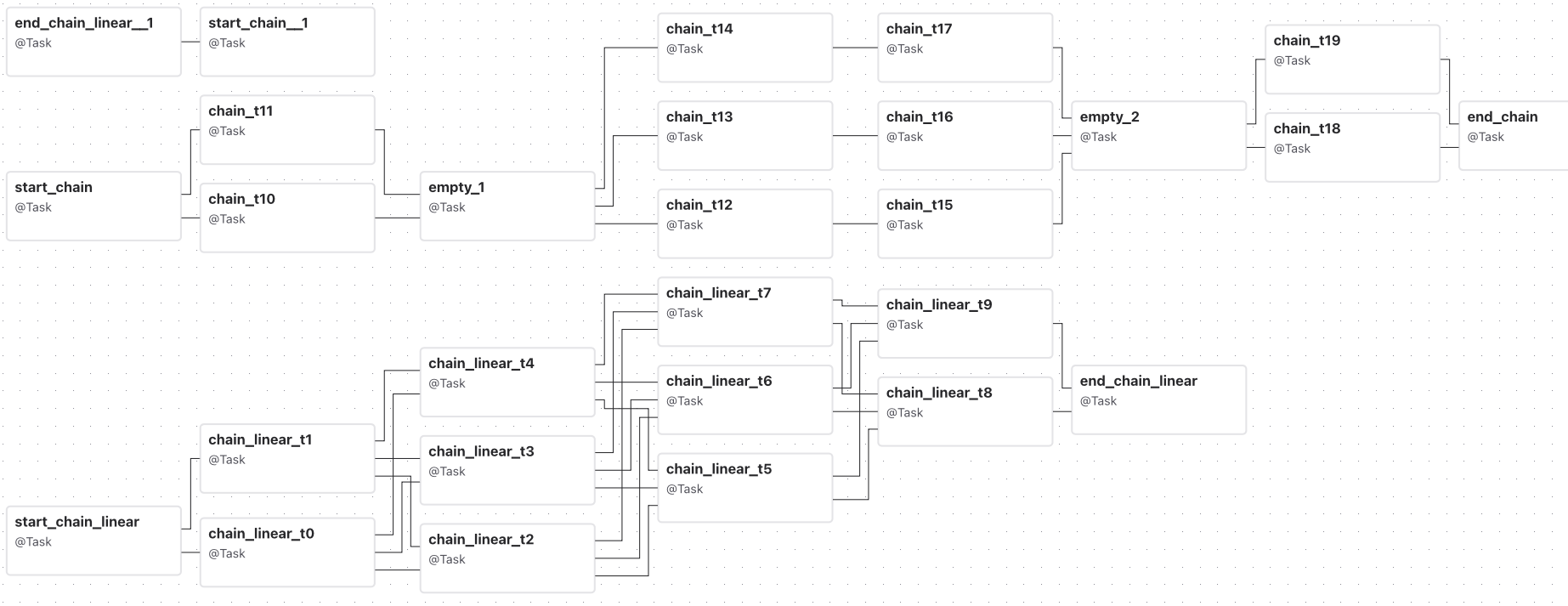
Example: Apache Airflow
To code or not to code
- Historically, automation was programming intensive
- Programmers were required to develop RPA bots
- Good for critical, industrial scale processes
- AI is great at coding, not so much at using GUI
- Agents may change this, but to what end?
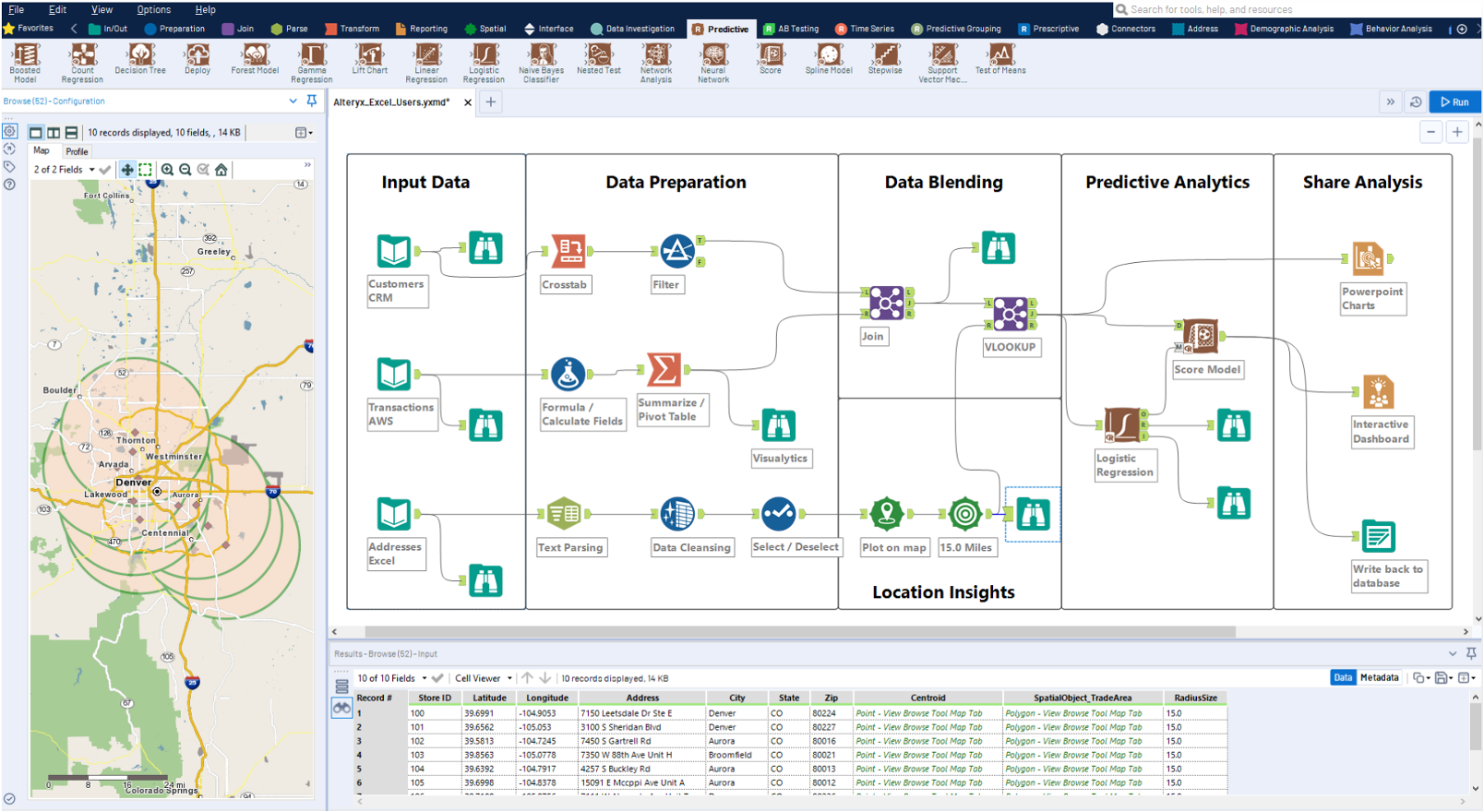
- Low-code: flow-chart based development, little/no code knowledge required, just logic & critical thinking
- No-code is less flexible, mostly pre-specified structures
Low-code solutions
- Ability to program shouldn’t limit automation
- Low-code refers to not organizing each step of the workflow with code, but rather pre-defined “steps”
- Examples:
- Automation: MS Power Automate, UiPath, Blue Prism
- Pipelines: Alteryx, Tableau Prep, Power BI, Qlik, SAP
Example: Alteryx
- @or(contains(toLower(triggerOutputs()?['body/subject']), 'homework'), contains(toLower(triggerOutputs()?['body/subject']), 'lab'), contains(toLower(triggerOutputs()?['body/subject']), 'project'), contains(toLower(triggerOutputs()?['body/subject']), '5150'))
- write an officescript script for Excel that takes all the entries in the sheet "GL", and makes 12 new sheets, one for each month, then copies in the rows from that table in GL to each sheet, based on the "Period" column (1 - 12 for jan - dec)
Human in the Loop
- RPA can’t handle un-known circumstances
- Well it will, but you probably won’t like it
- Human in the loop is when your process calls a human for help
- Important decision oversight
- When something goes wrong
Human in the Loop
- RPA can’t handle un-known circumstances
- Well it will, but you probably won’t like it
- Human in the loop is when your process calls a human for help
- Important decision oversight
- When something goes wrong
Evolution of RPA
- Basic RPA
- Advanced RPA
- Adds complex data processing (OCR) and analytics
- Intelligent Automation
- Uses AI/ML to add flexibility and make “judgements”,
- data driven
- Follows explicit, preprogrammed rules,
- process driven
- ❌Complex tasks, varied errors
- ✅
- Structured tasks, unstructured data
- Unstructured, complex tasks, flexibility, new scenarios (out of sample)
- ❌Certainty
- Structured tasks, repeatable outcomes, low error (in sample)
Common RPA Uses
- Accounts Payable (procure-to-pay): automate invoice processing (OCR) and vendor payments
- Accounts Receivable (order-to-cash): automate invoicing, billing, and collections
- Data Acquisition: automate downloading data, client files, etc.
- Account Reconciliations: automatically reconcile financial accounts and ledgers, 100% testing, flagging errors for review
- Report Generation: automate pulling, processing, and formatting of data into regular reports
- Payroll & HR expenses: validate timesheets, initiate direct deposits, employee expense reimbursements
RPA’s effect on Accountants
- Accountants used to be the data processors
- Manual data entry, reconciliations, account categorization, report generation
- Accountants are becoming process designers
- Understand historical accounting tasks, and can design processes to reliably conduct them
- More focus on problem solving, generalized thinking
Example: Inventory
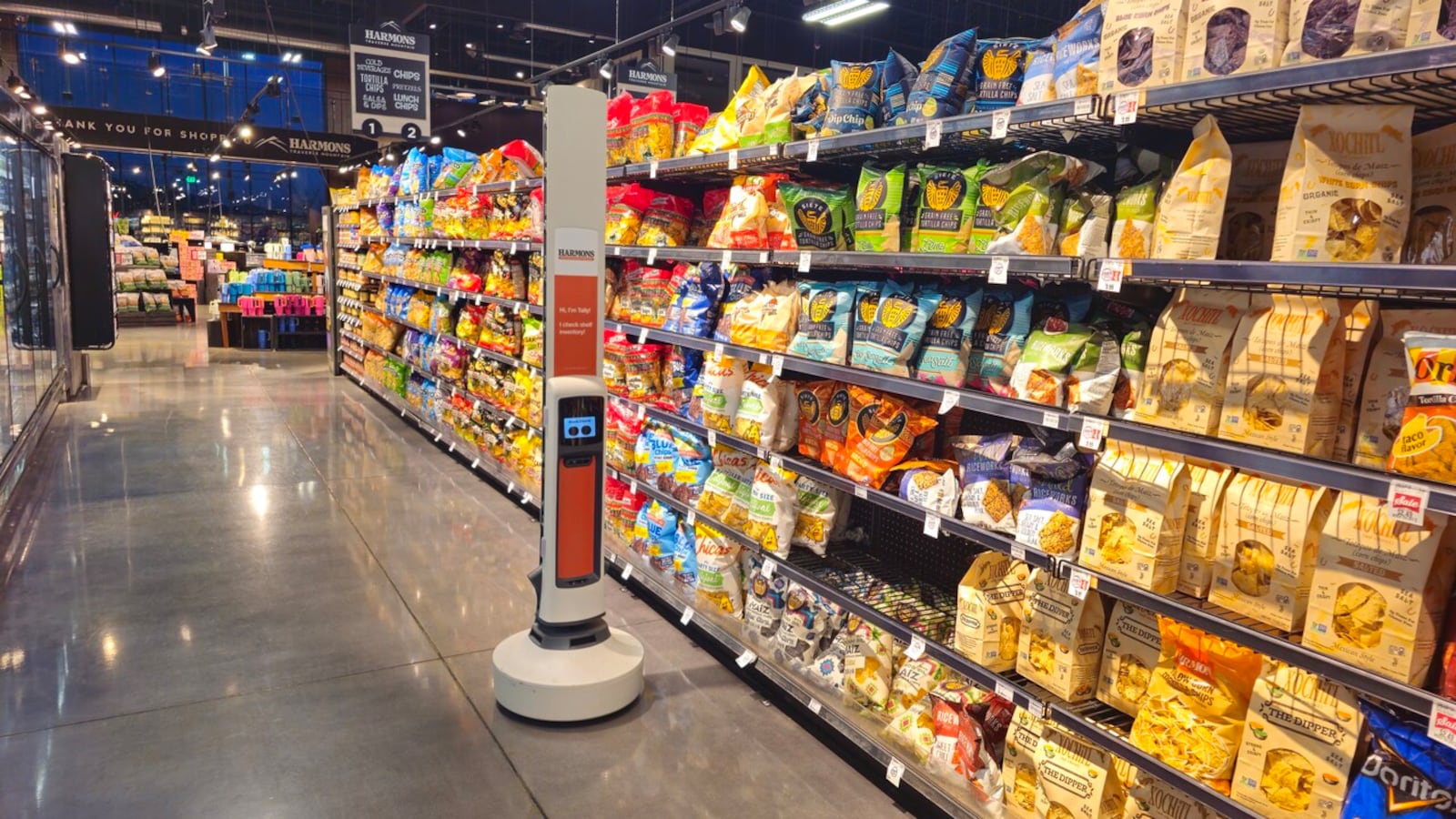
- BB/EB: RFID, weight, drone/robot tracking of inventory levels
- TI: Pull and aggregate data on purchases, OCR shipping labels
- TO: Monitor production (QA/QC), process order / fulfillment status
- Estimate demand, schedule production, and other analytics
Example: Invoice Processing
- Invoice received via email with multiple attachments
- OCR processing to extract data, AI to structure text
- Find invoice date, numbers, amounts, due date
- Extract all invoice line items across all pages, check items against purchase order
- Route data based on confidence in extracted data
- Reconciliation queue to auto-pay for good extraction
- Manual review for bad extraction
- Generate daily report for all invoices and bot results
Automation in Practice
- Unknown unknowns will always occur
- Make sure to handle them – error checking and reporting
- Automation development is an iterative process
- Try, break, fix, repeat
- People writing code may not be accountants
- Domain expertise is imperative to understanding what assumptions to make, check their work!
Automation You can do today
- Microsoft Power Automate
- Parse canvas emails to add due dates to your calendar
- AutoHotkey (Windows), AppleScript (Mac)
- Create hotkeys to do typical tasks, like resize windows
- Python scripts
- Read Journal of Accountancy RSS feed, send top 3 links to discord
- Bookmarklets, chrome extensions
- One-click open all your class assignment pages
- VSCode Copilot: write it all for you